
Pixel Flow Level 139: The Mandala Level That Tricks Symmetry Lovers
Level 139 looks beautifully balanced, but the symmetry is exactly what lures players into the wrong outer-ring decisions.
Why Level 139 Tricks So Many Good Players
Level 139 is memorable because it looks orderly. The mandala pattern feels symmetrical, balanced, and almost inviting — which is exactly why so many players make the wrong first decisions. The board encourages you to think in mirrored shapes, but the winning routes do not always respect that visual symmetry.
The real pressure point is the outer ring. If you route those early lines in a way that merely looks elegant, the center stops being flexible. By the time you notice the mistake, the inner core is already too cramped to recover cleanly.
This guide treats Pixel Flow Level 139 as a symmetry trap first and a color-count challenge second. Once you stop trying to mirror the artwork and start protecting the outer framework properly, the center becomes much easier to solve.
Level 139 Overview: Why Is It So Hard?
Before diving into the solution, let's understand what makes Level 139 such a notorious challenge:
- •The Symmetry Trap: The Mandala design appears perfectly symmetrical, which tricks your brain into thinking you can mirror moves. However, the solution requires asymmetric paths that break the visual pattern.
- •Extreme Space Management: There are very few "empty" tiles on this board. Every single move must be calculated because there's no room for error or backtracking.
- •Color Complexity: Managing 20 different colors simultaneously is mentally exhausting. It's easy to lose track of which paths you've already committed to.
- •Order Dependency: The sequence in which you connect colors matters tremendously. Starting with the wrong color can block critical paths for later connections.
Level 139 Video Walkthrough
Watch this complete 2-minute speed-solve to see the exact finger movements and path sequences. Pay close attention to which colors are connected first and how the outer framework is established before moving inward.
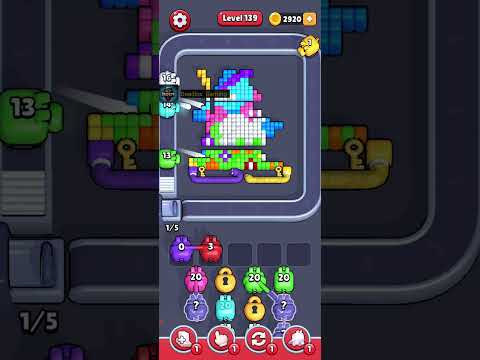
💡 Pro Tip: Watch the video at 0.5x speed first to understand the logic, then watch at normal speed to see the flow. Pause after each phase to compare with your own board.
Phase 1: Building the Outer Framework
The key to solving Level 139 is establishing a solid outer framework first. This creates the boundaries that will guide your inner connections.
Focus Colors: Green, Dark Blue, and Black
These are your longest lines and must follow the perimeter.
Strategy: "Hug the Walls"
- 1Start from the outermost edges: Begin with the Green line, which should trace along the top and right perimeter of the board.
- 2Follow with Dark Blue: This line hugs the left side and bottom, creating a complementary boundary to the Green line.
- 3Complete with Black: The Black line fills in the remaining perimeter gaps, completing your outer framework.
⚠️ Critical Warning: If you take any of these long lines through the center instead of the perimeter, you will block essential paths for the 15+ remaining colors. Always hug the walls!
Phase 2: Navigating the Middle Layer
Once your outer framework is set, it's time to work on the mid-range connections. This phase requires careful planning to avoid blocking paths for the center colors.
Focus Colors: Cyan, Yellow, and Purple
These colors act as bridges between the outer ring and inner core.
The "Bridge" Technique
Some lines in this phase must act as bridges, allowing shorter lines to reach the center. Think of these connections as creating tunnels or pathways for the remaining 5-8 colors.
- •Cyan connections: These typically run diagonally, creating natural corridors for other colors to pass through.
- •Yellow paths: Yellow often serves as a horizontal bridge, connecting left to right while leaving vertical space open.
- •Purple routes: Purple typically fills in the gaps, ensuring no color gets trapped.
🚫 Common Mistake: Don't "block" the paths for the remaining colors. Before committing to a middle-layer connection, visualize where the center colors will need to go. If your path cuts them off, find an alternative route.
Phase 3: Solving the Center Mandala
The final phase is where the Mandala truly comes together. If you've executed Phases 1 and 2 correctly, the center should fall into place naturally.
Focus Colors: Red, Orange, Pink, and White
These are the final pieces that complete the Mandala pattern.
Connecting the Core
By this stage, the available paths should be narrow and obvious. The outer and middle layers have created natural channels that guide these final connections.
- 1Start with Red: Red typically connects through the top-center corridor created by your middle-layer bridges.
- 2Follow with Orange: Orange fills in the side gaps, working around the Red path.
- 3Add Pink: Pink connects through the remaining vertical space.
- 4Complete with White: White is usually the final connection, filling in the last available path to complete the Mandala.
🔄 Backtracking Note: If a center color is blocked and you can't find a path, you must backtrack to Phase 2. Don't try to force a connection that doesn't exist—it means a middle-layer bridge was placed incorrectly.
Pro Tips for Pixel Flow Level 139
Tip 1: Work in Pairs
Instead of thinking about 20 individual tasks, look at the board as 10 pairs of dots. This mental shift reduces cognitive load and helps you see the connections more clearly.
Tip 2: Use the "Undo" Judiciously
Don't restart the whole level if you make a mistake. Usually, only the last 2-3 lines are the problem. Use the undo feature to backtrack just enough to fix the error without losing all your progress.
Tip 3: Path Visualization
Before dragging your finger to connect a color, trace the path with your eyes first. Ask yourself: "Does this path cut off a neighbor?" If yes, find an alternative route.
Tip 4: Take Breaks
Level 139 is mentally demanding. If you've failed 3-4 times in a row, take a 10-minute break. Coming back with fresh eyes often reveals solutions you couldn't see before.
Frequently Asked Questions
Q: Can I solve Level 139 in multiple ways?
A: While there are slight variations in the exact paths you can take, the tight space usually forces a very specific approach. The outer framework (Phase 1) must follow the perimeter—there's no alternative. The middle and center phases have some flexibility, but not much.
Q: What is the most common mistake on Level 139?
A: Taking the Black line through the center instead of the perimeter. This single mistake blocks multiple paths and makes the level impossible to complete. Always remember: long lines hug the walls!
Q: How long does it take to beat Level 139?
A: Once you know the solution, you can complete it in under 2 minutes. However, figuring out the solution on your own can take anywhere from 30 minutes to several hours, depending on your puzzle-solving experience.
Q: Is Level 139 the hardest level in Pixel Flow?
A: Level 139 is definitely one of the hardest levels in the early-to-mid game (levels 1-300). However, there are even more challenging levels later on, particularly in the 600+ range where patterns become even more complex.
Other Challenging Levels You Might Need Help With
If you found Level 139 challenging, these levels share similar complexity and will test your skills:
Level 125
Another symmetrical pattern that requires precise outer framework planning.
Level 189
Features 18 colors with similar space constraints and bridge techniques.
Level 279
A notoriously difficult level that builds on the skills you learned in Level 139.
Level 227
Complex pattern recognition with multiple overlapping paths.
Congratulations on Beating Level 139!
You've just conquered one of Pixel Flow's most beautiful and challenging levels. The Mandala pattern is a true test of spatial reasoning and strategic planning. With this guide and video walkthrough, you now have all the tools needed to beat Level 139 consistently.
Was Level 139 the hardest one for you so far? Share your experience in the comments below, and let us know which level you'd like a guide for next. Keep pushing forward—the satisfaction of solving these complex puzzles is what makes Pixel Flow so addictive!
View Full Level 139 Guide →